0%
Uploading
Advertisement
Our Track Record
Trusted by Millions
Over 60 million images checked, fast and private shutter count analysis you can rely on.
0 No Image Storage
<1s Fast Analysis *
30+ Supported Formats
60M+ Images Analyzed
* Analysis time only - Upload speed depends on your network connection.
Why choose us
Accurate and Private Shutter Count Checks
Built with a focus on privacy, speed, and ease of use, No sign-up required.
Lightning Fast
Instant analysis in milliseconds. Get your EXIF data without waiting.
Privacy First
Images are encrypted during transfer. We never store your original images.
Free Forever
No sign-up required. Completely free with unlimited analyses.
All Devices
Works perfectly on desktop, tablet, and mobile. Fully responsive on any screen.
All Formats
Supports ARW, NEF, CR3, RAF, RW2, DNG, JPEG, HEIC, PNG, TIFF and 30+ more.
Global Access
Available worldwide with no restrictions. Access instantly from anywhere.
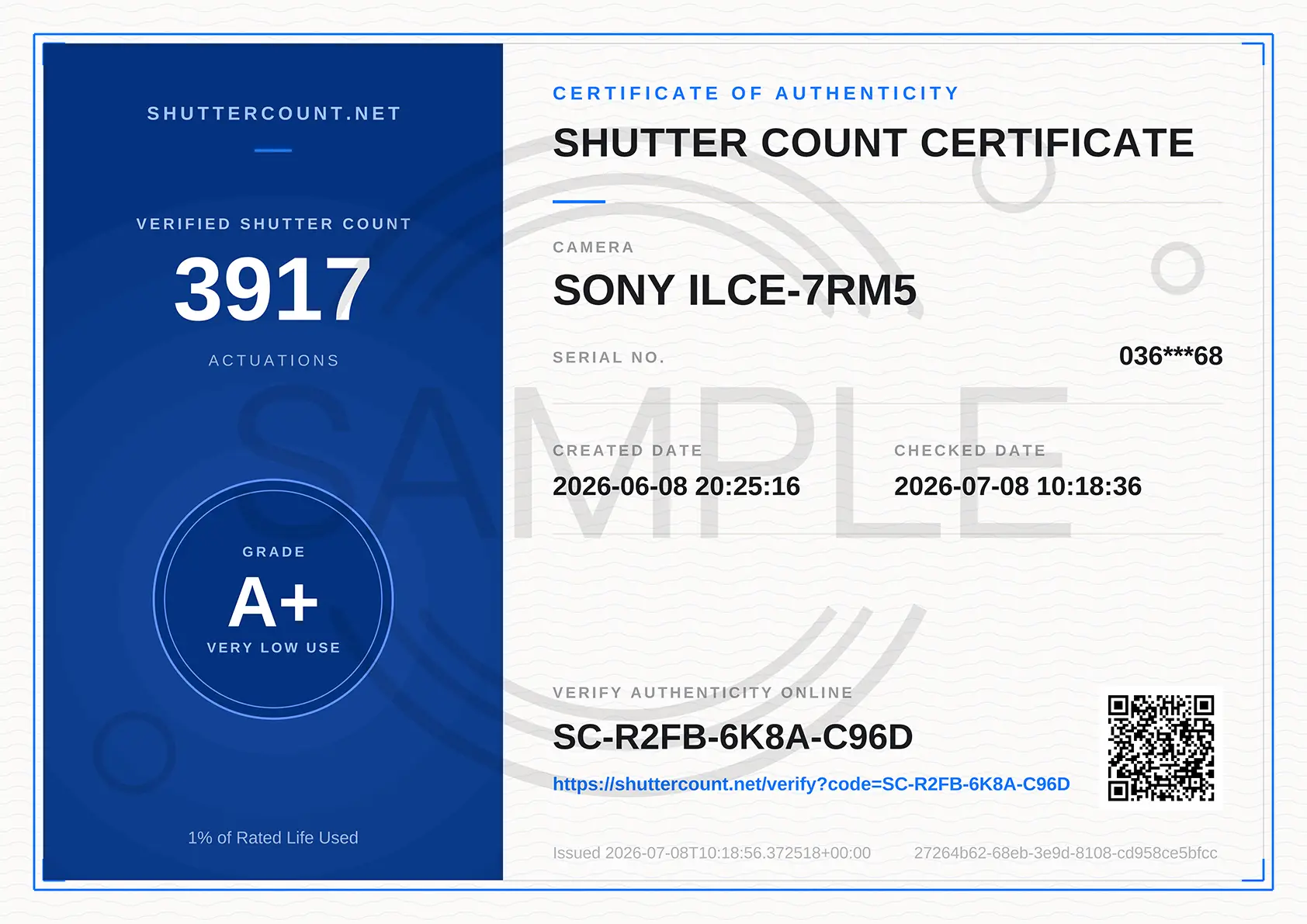
Shutter certificate
Turn your shutter count into proof
A verifiable PDF that buyers trust, not just another screenshot. Prove your camera's real shutter count in seconds.
Shareable PDF proof
Camera model, verified shutter count and issue date in a clean PDF you can send to any buyer.
Public verification
A unique code and QR that open our public verify page. Anyone can confirm it with no account.
Tamper resistant record
The record is signed at issue time, so edited screenshots and altered numbers do not hold up.
Resale value
Your shutter count maps to a condition grade and an estimated resale value on your certificate.
$1.99, pay once. No subscription. Download again anytime, free.
Get started in seconds
How It Works
Three simple steps to check your camera shutter count.
01
1
Upload Image
Drag and drop or click to select your image file from any device.
02
2
Instant Analysis
Our tool extracts the shutter count instantly, with no waiting required.
03
3
View Results
View the shutter count and all photo details, ready to copy or share.
Featured Reads
Expert Guides & Insights
Guides on checking shutter count for Sony, Nikon, Canon, Fujifilm, Pentax, and more.



How do I check my camera's shutter count?
Just take a photo with your camera in JPEG or RAW format, then drag the image into the upload box on this page. RAW files give the most reliable reading, so use one if you can. Your shutter count shows up right away, for free.
Your photo is never saved on our servers. It is deleted for good as soon as the reading is done.
You can read more in our Privacy Policy.
What is a good shutter count?
For a used camera, a lower shutter count is better. A low count usually sits within the first 10 to 20 percent of the camera's rated shutter life. For a camera sold as new, a good shutter count is close to zero.
There is no single perfect number, since it depends on the model. A pro camera rated for 300,000 actuations with 50,000 shots has plenty of life left. An entry-level camera rated for 100,000 with the same count is much closer to the end. Always compare the count against what the camera is built to handle.
Is a high shutter count bad?
Not always. A high count means the camera has been used a lot, but it does not mean the camera is about to break. Many cameras keep working well past their rated life, while a few fail early.
As a rule of thumb, a shutter count is considered high once it passes about 70 percent of the camera's rated life. At that point the shutter has done real work, so it is smart to factor that into the price when you buy or sell.
How long does a camera shutter last?
Shutter life depends on the camera tier:
- Entry-level cameras are usually rated for around 100,000 actuations.
- Mid-range models often last between 150,000 and 200,000 actuations.
- Professional cameras are built to go beyond 300,000 actuations.
These are estimates from the makers, not hard limits. Real life depends on how the camera is used and cared for.
Can a camera's shutter count be reset or faked?
No. The shutter count is stored deep inside the camera and cannot be reset or changed by the user. It only goes up, never down.
So if a seller claims they reset the count, or a used camera shows a count that looks too low for its age, treat it as a warning sign. A pro body that is a few years old with only a couple thousand shots is worth a closer look before you buy.
Why does shutter count matter?
The shutter count works like the odometer on a car. It tells you how much the camera has really been used. Here is why people check it:
- Buy and sell with confidence: A verified low count helps a used camera sell for more, and it protects buyers from overpaying for a worn body.
- Plan for maintenance: Knowing your count helps you guess when a service or shutter replacement might be coming.
- Judge a camera's health: The count is the clearest single sign of how much life the shutter has left.
How is the shutter count stored in a camera?
Every time the mechanical shutter fires, the camera quietly adds one to a running total and saves that number with the photo. That number is the shutter count.
Most cameras from Sony, Nikon, Canon, Fujifilm, Pentax, and Ricoh save this number the same way, which is why you can read it straight from a photo. A few brands and older models do not save it at all, so the count cannot always be found.
Does the electronic shutter add to the shutter count?
For most cameras, using the electronic shutter does not add to the shutter count.
The count only tracks the mechanical shutter, since that is the part that physically wears out. The electronic shutter has no moving parts, so shots taken with it are not counted.